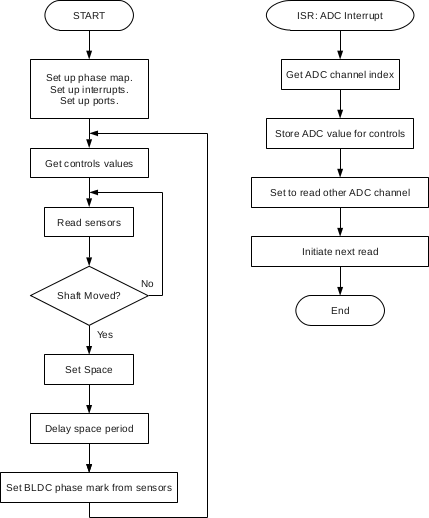
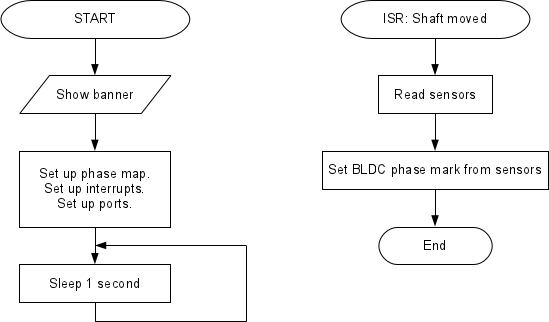
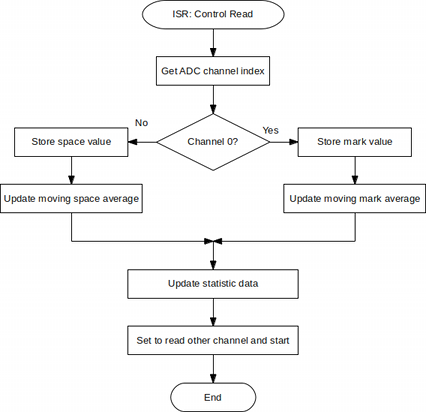
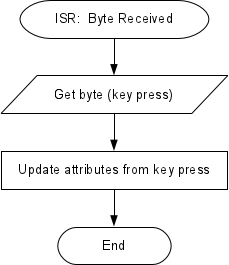
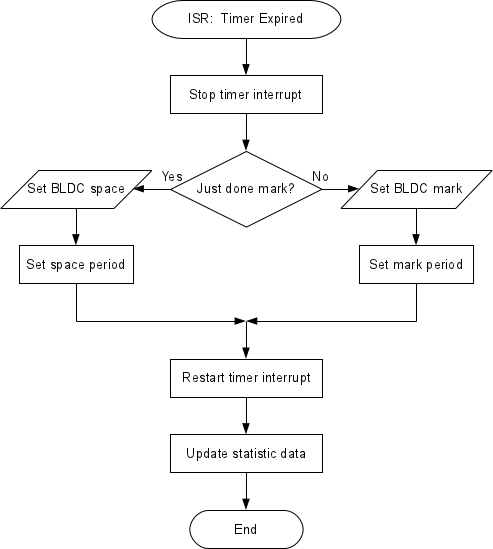
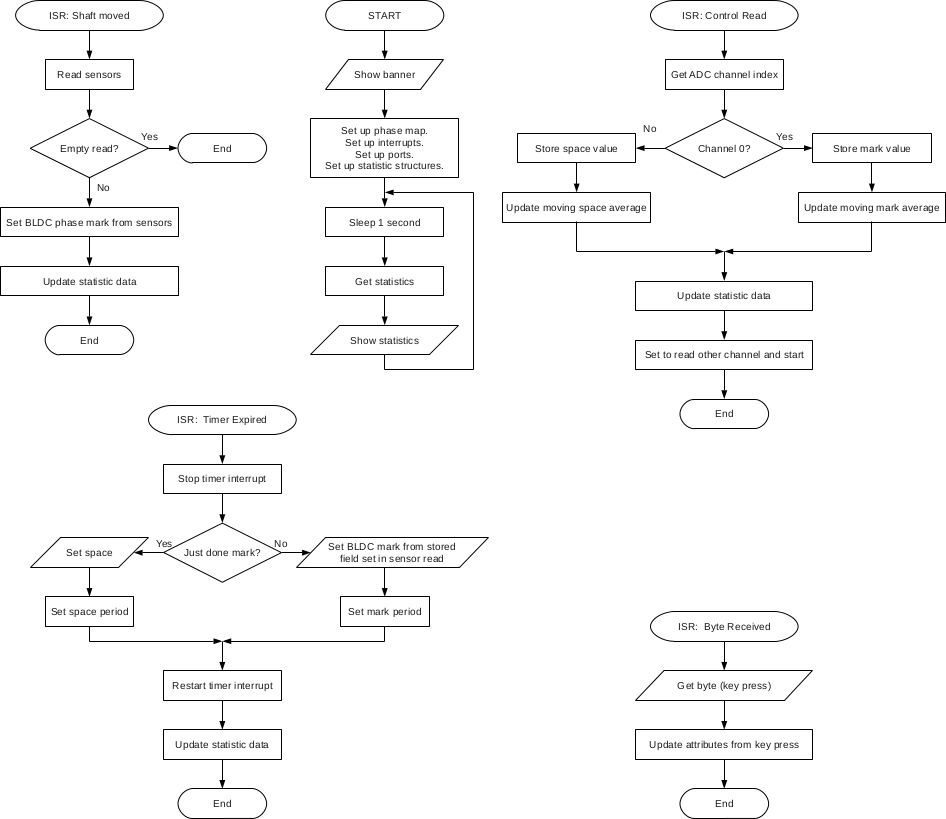
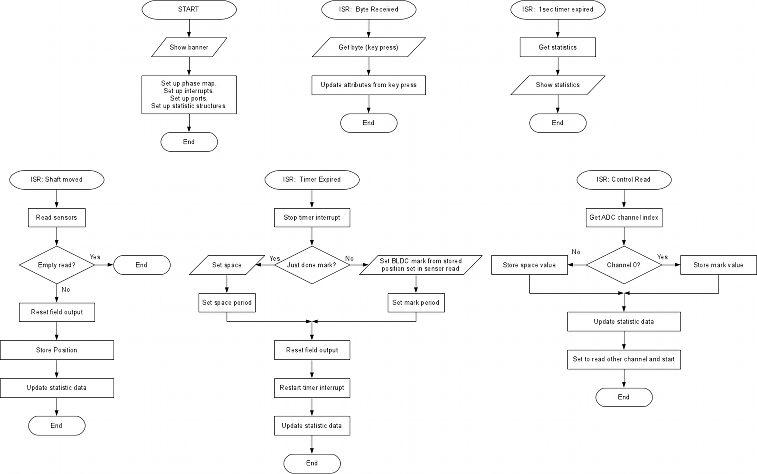
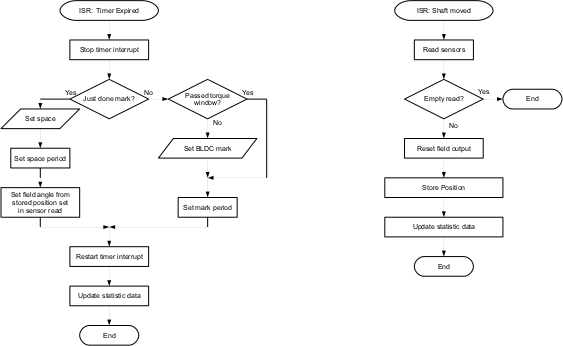
The software is possibly the most complex part of the project to develop.
Here strong belief is in simplicity, small steps and peer reviewing.
Because of this, the software will be open source and the steps well documented for maximum peer understanding.
However this is a fixed 50/50 mark/space.
This is good as a starting point, but it is necessary to vary the mark/space.
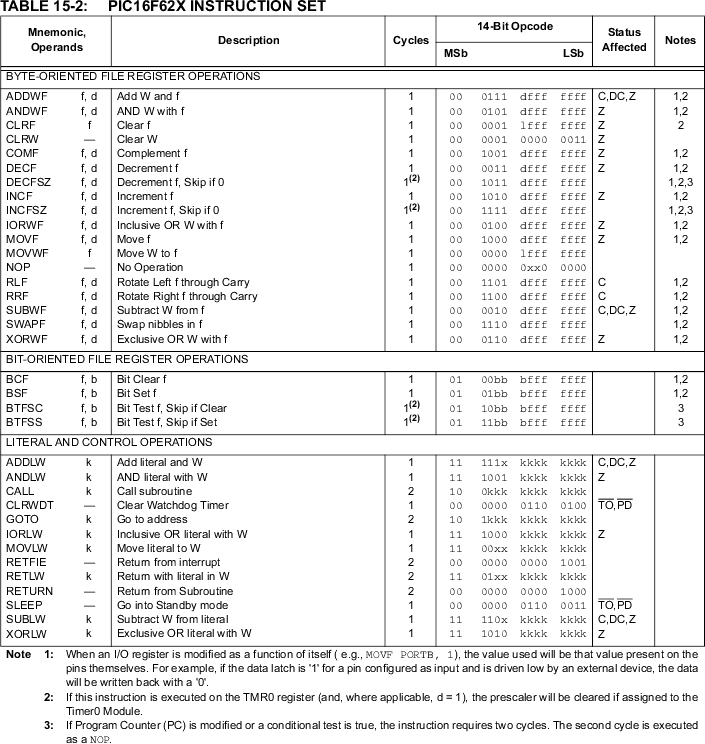
This is where things go wrong, since every instruction take time.
                ; Intialise the mark/space times

		MOVLW	63         	; 1 <= count <= 63
		MOVWF	SPACELENGTH     ; Set the space time

		MOVLW	1               ; 1 <= count <= 63
		MOVWF	MARKLENGTH      ; Set the mark time

		GOTO	PCM_LOOP

;               *********************************************
;               *  PCM Routine                              *
;               *********************************************

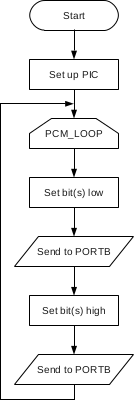
PCM_LOOP        MOVLW   B'00000000'     ; Set all LEDS off
                MOVWF   PORTB           ; Send to PORT B

                MOVF    SPACELENGTH,W   ; Get the space time
                MOVWF   SPACETIMER      ; Initialise the timer
SPACE_LOOP      DECFSZ  SPACETIMER,F    ; Count down
                GOTO    SPACE_LOOP      ; Loop until zero

                NOP                     ; Give symmetry
                NOP                     ; Give symmetry
                MOVLW   B'00111111'     ; Set all LEDS on
                MOVWF   PORTB           ; Send to PORT B

                MOVF    MARKLENGTH,W    ; Get the mark time
                MOVWF   MARKTIMER       ; Initialise the timer
MARK_LOOP       DECFSZ  MARKTIMER,F     ; Count down
                GOTO    MARK_LOOP       ; Loop until zero

                GOTO    PCM_LOOP
So a mechanism is needed for varying the mark/space ratio.
There is another way to to this:
A fixed loop which counts 0 to 255 can be used and a variable which holds the mark time.
The loop scans with bits high until the magic value then flips to low.
This is similar to a frame relay used in mobile phones to transmit and receive data to/from the base radio.
This is probably more robust than timers since the the loop always executes the same instructions and may loop faster.
Also the ability to have two(or more) registers for 16-bit (or higher) resolution.
At this stage it might be worth pointing out that it's obviously unrealistic to expect the final controller to be using a PIC.
Most likely it will be using an EPIA motherboard or similar and running a real-time Linux kernel (livecd).
This will make communication easy via ethernet and the ability to develop the real-time controller software using a frame relay built as a RT process in the pre-emptive scheduler.
Also the PIC16F628 which is being tested has built-in PWM outputs, so it would seem a better course of action to use these.
This is an animation of the fields and phases of 3-phase DC motor commutation.
This is actually the same whether brushed or brushless.
In a brushed motor the commutation is mechanical using a commutator attached to the shaft of the armature and usually carbon brushes.
The animation represents the fields on the armature with respect to the shaft as it rotates.
The actual field with respect to the stator magnets (or the case) is more or less in the same direction at approximately 90 degrees to the stator field for maximum torque.
In a brushless motor the magnets are on the rotor and the stator field is rotated to draw the rotor field around.
This rotating stator field is provided by 3 electromagnets (U, V and W in the animation) at 120 degrees to each other and energised in sequence using a controller.
This is the commutation aimed for in the PIC software, which is easy to translate using the table on the left of the animation.
;       ***********************************************
;       *  PCM Routine which does BLDC commutation    *
;       *  Without the delays rotates in 48uS (21kHz) *
;       ***********************************************
PCM_LOOP    MOVLW   B'00011010' ; 1
            MOVWF   PORTB
            CALL    DELAY_ROUTINE
            NOP  ; Give symmetry
            NOP  ; Give symmetry

            MOVLW   B'00010010' ; 2
            MOVWF   PORTB
            CALL    DELAY_ROUTINE
            NOP  ; Give symmetry
            NOP  ; Give symmetry

            MOVLW   B'00010110' ; 3
            MOVWF   PORTB
            CALL    DELAY_ROUTINE
            NOP  ; Give symmetry
            NOP  ; Give symmetry

            MOVLW   B'00000110' ; 4
            MOVWF   PORTB
            CALL    DELAY_ROUTINE
            NOP  ; Give symmetry
            NOP  ; Give symmetry

            MOVLW   B'00100110' ; 5
            MOVWF   PORTB
            CALL    DELAY_ROUTINE
            NOP  ; Give symmetry
            NOP  ; Give symmetry

            MOVLW   B'00100100' ; 6
            MOVWF   PORTB
            CALL    DELAY_ROUTINE
            NOP  ; Give symmetry
            NOP  ; Give symmetry

            MOVLW   B'00100101' ; 7
            MOVWF   PORTB
            CALL    DELAY_ROUTINE
            NOP  ; Give symmetry
            NOP  ; Give symmetry

            MOVLW   B'00100001' ; 8
            MOVWF   PORTB
            CALL    DELAY_ROUTINE
            NOP  ; Give symmetry
            NOP  ; Give symmetry

            MOVLW   B'00101001' ; 9
            MOVWF   PORTB
            CALL    DELAY_ROUTINE
            NOP  ; Give symmetry
            NOP  ; Give symmetry

            MOVLW   B'00001001' ; 10
            MOVWF   PORTB
            CALL    DELAY_ROUTINE
            NOP  ; Give symmetry
            NOP  ; Give symmetry

            MOVLW   B'00011001' ; 11
            MOVWF   PORTB
            CALL    DELAY_ROUTINE
            NOP  ; Give symmetry
            NOP  ; Give symmetry

            MOVLW   B'00011000' ; 12
            MOVWF   PORTB
            CALL    DELAY_ROUTINE
            GOTO    PCM_LOOP

DELAY_ROUTINE   MOVLW   H'7F'
                MOVWF   TIMER1
DEL_LOOP1       MOVLW   H'FF'
                MOVWF   TIMER2
DEL_LOOP2       DECFSZ  TIMER2,F
                GOTO    DEL_LOOP2
                DECFSZ  TIMER1,F
                GOTO    DEL_LOOP1
                RETLW   0
;                            + + +
;                           UUVVWW
;                           - - -
STEP01          EQU     B'00011010'
STEP02          EQU     B'00010010'
STEP03          EQU     B'00010110'
STEP04          EQU     B'00000110'
STEP05          EQU     B'00100110'
STEP06          EQU     B'00100100'
STEP07          EQU     B'00100101'
STEP08          EQU     B'00100001'
STEP09          EQU     B'00101001'
STEP10          EQU     B'00001001'
STEP11          EQU     B'00011001'
STEP12          EQU     B'00011000'

BLDC_LOOP       MOVLW   STEP01          ; Get bit pattern for BLDC step
                MOVWF   PORTB           ; Set output lines
                CALL    DELAY_ROUTINE   ; Do intersample delay
                NOP                     ; Give symmetry
                NOP                     ; Give symmetry

  . . . steps 02 - 11 removed for clarity

                MOVLW   STEP12          ; Get bit pattern for BLDC step
                MOVWF   PORTB           ; Set output lines
                CALL    DELAY_ROUTINE   ; Do intersample delay
                GOTO    BLDC_LOOP       ; Repeat BLDC sequence (2 cycles)

DELAY_ROUTINE   MOVF    TIME1,W         ; Get initial count
                MOVWF   TIMER1          ; Set the timer
DEL_LOOP        DECFSZ  TIMER1,F        ; Count down
                GOTO    DEL_LOOP        ; Repeat

                MOVF    TIME3,W         ; Get initial count
                MOVWF   TIMER3          ; Set the timer
DEL_LOOP4       DECFSZ  TIMER3,F        ; Count down
                GOTO    DEL_LOOP4       ; Repeat

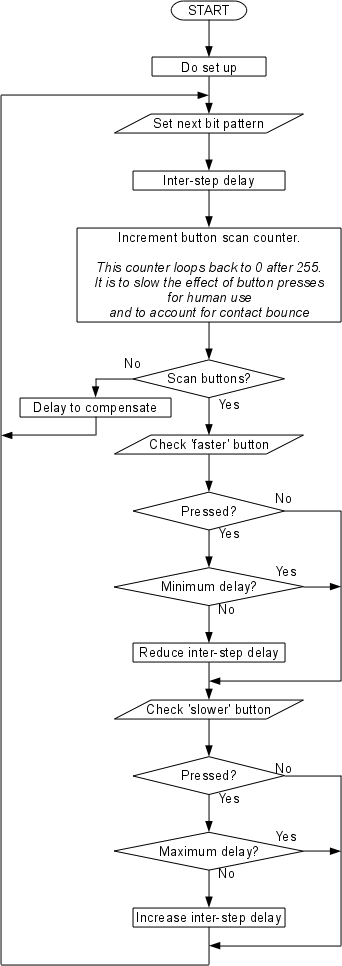
                INCFSZ  TIME2,1         ; Count up button scan timer (256 wrap around)
                GOTO    ENDLOOP         ; Jump out if non-zero
                GOTO    UPDOWN          ; Jump to button scan if zero (every 256 delays)

ENDLOOP         NOP                     ; Give symmetry
                NOP                     ; Give symmetry
                NOP                     ; Give symmetry
                NOP                     ; Give symmetry
                NOP                     ; Give symmetry
                RETLW   0               ; Return to BLDC loop

UPDOWN          BTFSC   PORTA,SW1       ; Skip next if SW1 is up
                DECFSZ  TIME1,F         ; Decrement first timer initial value
                GOTO    UP              ; Jump if first timer initial value is non-zero
                INCF    TIME1,F         ; Re-increment first timer if zero

UP              BTFSC   PORTA,SW2       ; Skip next if SW2 is up
                INCFSZ  TIME1,F         ; Increment first timer initial value
                GOTO    UPDOWN3         ; Jump if first timer initial value is non-zero
                DECF    TIME1,F         ; Re-decrement to 255 first timer if zero

UPDOWN3         BTFSC   PORTA,SW3       ; Skip next if SW3 is up
                DECFSZ  TIME3,F         ; Decrement second timer initial value
                GOTO    UP3             ; Jump if second timer initial value is non-zero
                INCF    TIME3,F         ; Re-increment second timer if zero

UP3             BTFSC   PORTA,SW4       ; Skip next if SW4 is up
                INCFSZ  TIME3,F         ; Increment second timer initial value
                GOTO    BACK            ; Jump if second timer initial value is non-zero
                DECF    TIME3,F         ; Re-decrement to 255 first timer if zero

BACK            INCF    TIME2,F         ; Bump up button scan counter
                RETLW   0               ; Return to BLDC loop
This actually uses 2 loops with 2 separate button controls (SW1 & 2 first loop, SW3 & 4 second loop).
This was done to experiment with the motor's limits and extra delay is required to slow the loop down to usable periods.
Using a oscilloscope BLDC frequency input was 555.5Hz (the 12 step sequence repeated 555.5 times a second).
The motor under experiment is a 7 phase model helicopter motor running at 3v.
So the highest rpm was found to be 4,761.4 RPM (555.5Hz / 7 phases x 60 seconds).
The PIC could drive it to much higher RPMs, but the motor didn't seem capable of physically spinning any faster.
Once the voltage was increased to 6v, which was the maximum my 3A power pack would allow before cutting out,
A frequency up to 943.3Hz was observed, which translates to 8,085 RPM.
That's over 6 times the rated RPM!
Not bad for a motor rated at max 1,300 RPM
Of course, in a vehicle the motor will in no way require these extreme RPMs (more likely a twentieth of this),
but it proves the humble low spec PIC is quite able to operate fast enough to run a BLDC motor in a real car.
PWM control
In order to modularise things it might be easier to have separate PWM control to the commutation.
Not sure about this as it might end up more expensive, but we need to have all solutions tested before we can pick the best one.
In that light a simple PWM algorithm has been created to test PWM control on a brushed series would motor.
This is much the same as the BLDC controller but with 2 steps and separate delays for each step.
;               **********************************
;               **  RESET :  main boot routine  **
;               **********************************

RESET           MOVLW   B'00000111'     ; Disable Comparator module's
                MOVWF   CMCON

                BSF     STATUS,RP0      ; Switch to register bank 1
                                        ; Disable pull-ups
                                        ; INT on rising edge
                                        ; TMR0 to CLKOUT
                                        ; TMR0 Incr low2high trans.
                                        ; Prescaler assign to Timer0
                                        ; Prescaler rate is 1:256

                MOVLW   B'11010111'     ; Set PIC options (See datasheet).
                MOVWF   OPTION_REG      ; Write the OPTION register.

                CLRF    INTCON          ; Disable interrupts
                MOVLW   B'11000000'     ; RB7 & RB6 are inputs, RB5...RB0 are outputs.
                MOVWF   TRISB           ; Set BLDC sequence port

                MOVLW   B'11111111'     ; all RA ports are inputs
                MOVWF   TRISA           ; Set button port

                BCF     STATUS,RP0      ; Switch Back to reg. Bank 0
                CLRF    PORTB           ; Reset BLDC sequence port

                MOVLW   MARKINITIAL     ; Get default value for MARKTIMER
                MOVWF   MARKPERIOD      ; Initialise MARKTIMER

                MOVLW   SPACEINITIAL    ; Get default value for SPACETIMER
                MOVWF   SPACEPERIOD     ; Initialise SPACETIMER

                GOTO    PCMLOOP         ; Start the PCM loop (non return)

;               ***********************************************
;               *  PCM Routine which does Mark-Space          *
;               ***********************************************

PCMLOOP         MOVLW   SOMEON          ; Get bit pattern for PWM HIGH
                MOVWF   PORTB           ; Set output lines
                CALL    MARKDELAY       ; Do intersample delay
                NOP                     ; Give symmetry
                NOP                     ; Give symmetry

                MOVLW   SOMEOFF         ; Get bit pattern for PWM LOW
                MOVWF   PORTB           ; Set output lines
                CALL    SPACEDELAY      ; Do intersample delay
                GOTO    PCMLOOP         ; Repeat

;               ***********************************************
;               * Button read and period adjustments          *
;               ***********************************************

MARKDELAY       MOVF    MARKPERIOD,W    ; Get initial count
                MOVWF   MARKTIMER       ; Set the timer
MARKDELAYLOOP   DECFSZ  MARKTIMER,F     ; Count down
                GOTO    MARKDELAYLOOP   ; Repeat

                INCFSZ  BUTTONTIMER,W   ; Count up button scan timer (256 wrap around)
                GOTO    ENDMARKDELAY    ; Jump out if non-zero
                GOTO    MARKUPDOWN      ; Jump to button scan if zero (every 256 delays)

ENDMARKDELAY    NOP                     ; Give symmetry
                NOP                     ; Give symmetry
                NOP                     ; Give symmetry
                NOP                     ; Give symmetry
                NOP                     ; Give symmetry
                RETLW   0               ; Return to BLDC loop

MARKUPDOWN      BTFSC   PORTA,SW1       ; Skip next if SW1 is up
                DECFSZ  MARKPERIOD,F    ; Decrement first timer initial value
                GOTO    MARKUP          ; Jump if first timer initial value is non-zero
                INCF    MARKPERIOD,F    ; Re-increment first timer if zero

MARKUP          BTFSC   PORTA,SW2       ; Skip next if SW2 is up
                INCFSZ  MARKPERIOD,F    ; Increment first timer initial value
                GOTO    MARKBACK        ; Jump if first timer initial value is non-zero
                DECF    MARKPERIOD,F    ; Re-decrement to 255 first timer if zero

MARKBACK        INCF    BUTTONTIMER,F   ; Bump up button scan counter
                RETLW   0               ; Return to BLDC loop

SPACEDELAY      MOVF    SPACEPERIOD,W   ; Get initial count
                MOVWF   SPACETIMER      ; Set the timer
SPACEDELAYLOOP  DECFSZ  SPACETIMER,F    ; Count down
                GOTO    SPACEDELAYLOOP  ; Repeat

                INCFSZ  BUTTONTIMER,W   ; Count up button scan timer (256 wrap around)
                GOTO    ENDSPACEDELAY   ; Jump out if non-zero
                GOTO    SPACEUPDOWN     ; Jump to button scan if zero (every 256 delays)

ENDSPACEDELAY   NOP                     ; Give symmetry
                NOP                     ; Give symmetry
                NOP                     ; Give symmetry
                NOP                     ; Give symmetry
                NOP                     ; Give symmetry
                RETLW   0               ; Return to BLDC loop

SPACEUPDOWN     BTFSC   PORTA,SW3       ; Skip next if SW3 is up
                DECFSZ  SPACEPERIOD,F   ; Decrement first timer initial value
                GOTO    SPACEUP         ; Jump if first timer initial value is non-zero
                INCF    SPACEPERIOD,F   ; Re-increment first timer if zero

SPACEUP         BTFSC   PORTA,SW4       ; Skip next if SW4 is up
                INCFSZ  SPACEPERIOD,F   ; Increment first timer initial value
                GOTO    SPACEBACK       ; Jump if first timer initial value is non-zero
                DECF    SPACEPERIOD,F   ; Re-decrement to 255 first timer if zero

SPACEBACK       INCF    BUTTONTIMER,F   ; Bump up button scan counter
                RETLW   0               ; Return to BLDC loop

                END
Now the PIC has a PWM output controller built in as well (called a CCP module), but it is not going to used as yet.
This is for two reasons:
The code for a PWM was created as precursor to the BLDC so it's relatively simple to update it.
The CCP module is a little in-depth and is not required just to build/test the electronics/electrics.
In actual fact there is simple a way of incorporating the PWM into the BLDC commutation.
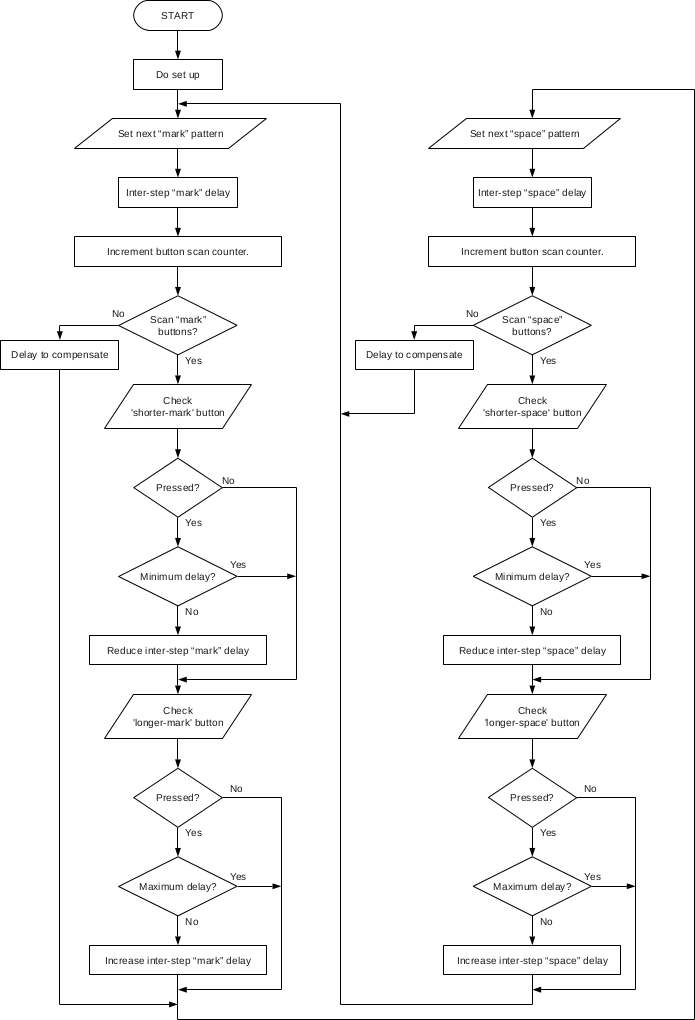
This can be done by adding in an intermediate space step between each of the 12 "mark" steps producing 24 steps.
The timing of the "mark" BLDC step delay can be varied independently of the "space" step delay, thus giving a PWM.
This, of course, will be low frequency and in fact the frequency is a function of the shaft speed.
Having a low frequency will naturally make the system more efficient as the IGBTs will spend more time on the switched states and less time in the transitional states.
The by-product is that there will be more noise from the motors operation.
This is a desirable thing for the Mass-EV and the Impulse-EV as it is not the target of this project to be the smoothest and quietest experience.
Certainly the Impulse-EV will be designed to have a sense of presence and occasion, rather than a mousey high speed stealth machine.
The BLDC mark to PWM space ratio will vary to provide the torque control.
The mark will be between 0 and 30 degrees of the phase, 0 being no torque and 30 being maximum.
As usual the stator field will be 90 degrees to the rotor field.
This will make it nice and simple to commutate with torque control without the use of the heavy maths involved in Clarke and Park transforms.
This uses double nested loops since the test is using relays and needs to operate slowly
;==========================================================================
; PCMBLDCLOOP: PCM Routine which does BLDC commutation
;==========================================================================

PCMBLDCLOOP     MOVLW   STEP01          ; Get bit pattern for BLDC step
                MOVWF   PORTB           ; Set output lines
                CALL    MARKDELAY       ; Do intersample delay
                NOP                     ; Give symmetry
                NOP                     ; Give symmetry

                MOVLW   ALLOFF          ; Get bit pattern for PWM LOW
                MOVWF   PORTB           ; Set output lines
                CALL    SPACEDELAY      ; Do intersample delay
                NOP                     ; Give symmetry
                NOP                     ; Give symmetry

  . . . steps 02 - 11 removed for clarity

                MOVLW   STEP12          ; Get bit pattern for BLDC step
                MOVWF   PORTB           ; Set output lines
                CALL    MARKDELAY       ; Do intersample delay
                NOP                     ; Give symmetry
                NOP                     ; Give symmetry

                MOVLW   ALLOFF          ; Get bit pattern for PWM LOW
                MOVWF   PORTB           ; Set output lines
                CALL    SPACEDELAY      ; Do intersample delay
                GOTO    PCMBLDCLOOP     ; Repeat BLDC sequence (2 cycles)
;==========================================================================
; MARKDELAY: Button read and period adjustments
;==========================================================================

MARKDELAY       MOVF    MARKPERIOD,W    ; Get initial count
                MOVWF   MARKTIMER       ; Set the timer

MARKDELAYLOOP   MOVF    MARKPERIOD,W    ; Get initial count
                MOVWF   MARKINNERTIMER  ; Set the timer

MARKINNERLOOP   DECFSZ  MARKINNERTIMER,F; Count down
                GOTO    MARKINNERLOOP   ; Repeat

                DECFSZ  MARKTIMER,F     ; Count down
                GOTO    MARKDELAYLOOP   ; Repeat

                INCFSZ  BUTTONTIMER,F   ; Count up button scan timer (256 wrap around)
                GOTO    ENDMARKDELAY    ; Jump out if non-zero
                GOTO    MARKUPDOWN      ; Jump to button scan if zero (every 256 delays)

ENDMARKDELAY    NOP                     ; Give symmetry
                NOP                     ; Give symmetry
                NOP                     ; Give symmetry
                NOP                     ; Give symmetry
                NOP                     ; Give symmetry
                RETLW   0               ; Return to BLDC loop

MARKUPDOWN      BTFSC   PORTA,SW1       ; Skip next if SW1 is up
                DECFSZ  MARKPERIOD,F    ; Decrement first timer initial value
                GOTO    MARKUP          ; Jump if first timer initial value is non-zero
                INCF    MARKPERIOD,F    ; Re-increment first timer if zero

MARKUP          BTFSC   PORTA,SW2       ; Skip next if SW2 is up
                INCFSZ  MARKPERIOD,F    ; Increment first timer initial value
                GOTO    MARKBACK        ; Jump if first timer initial value is non-zero
                DECF    MARKPERIOD,F    ; Re-decrement to 255 first timer if zero

MARKBACK        INCF    BUTTONTIMER,F   ; Bump up button scan counter
                RETLW   0               ; Return to BLDC loop

;==========================================================================
; SPACEDELAY: Button read and period adjustments
;==========================================================================

SPACEDELAY      MOVF    SPACEPERIOD,W   ; Get initial count
                MOVWF   SPACETIMER      ; Set the timer

SPACEDELAYLOOP  MOVF    SPACEPERIOD,W   ; Get initial count
                MOVWF   SPACEINNERTIMER ; Set the timer

SPACEINNERLOOP  DECFSZ  SPACEINNERTIMER,F    ; Count down
                GOTO    SPACEINNERLOOP  ; Repeat

                DECFSZ  SPACETIMER,F    ; Count down
                GOTO    SPACEDELAYLOOP  ; Repeat

                INCFSZ  BUTTONTIMER,F   ; Count up button scan timer (256 wrap around)
                GOTO    ENDSPACEDELAY   ; Jump out if non-zero
                GOTO    SPACEUPDOWN     ; Jump to button scan if zero (every 256 delays)

ENDSPACEDELAY   NOP                     ; Give symmetry
                NOP                     ; Give symmetry
                NOP                     ; Give symmetry
                NOP                     ; Give symmetry
                NOP                     ; Give symmetry
                RETLW   0               ; Return to BLDC loop

SPACEUPDOWN     BTFSC   PORTA,SW3       ; Skip next if SW3 is up
                DECFSZ  SPACEPERIOD,F   ; Decrement first timer initial value
                GOTO    SPACEUP         ; Jump if first timer initial value is non-zero
                INCF    SPACEPERIOD,F   ; Re-increment first timer if zero

SPACEUP         BTFSC   PORTA,SW4       ; Skip next if SW4 is up
                INCFSZ  SPACEPERIOD,F   ; Increment first timer initial value
                GOTO    SPACEBACK       ; Jump if first timer initial value is non-zero
                DECF    SPACEPERIOD,F   ; Re-decrement to 255 first timer if zero

SPACEBACK       INCF    BUTTONTIMER,F   ; Bump up button scan counter
                RETLW   0               ; Return to BLDC loop

                END
Merged the PWM code with the BLDC code, total program: size 365 lines including space and comments.
This is the modified BLDC code to include PWM.
If you don't like the stereoscopic 3D just switch it off.
Arduino (ATMEL SBC)
Looking at an Arduino as perhaps an alternative to a PIC.
There's nothing wrong with the PIC, but the AMTEL CPU already has 6 ADCs and 6 PWM outputs plus other DIO.
Ethernet can also be added and even wireless quite cheaply.
This means it's possible to write a simple UI as a http server and operate the thing directly from a PC using a browser.
The project is very Linux friendly and the IDE is quite simple to use.
Some preliminary tests to get a grip on the speed of the CPU:
void setup()
{
  // initialize the digital pin as an output.
  // Pin 13 has an LED connected on most Arduino boards:
  pinMode(13, OUTPUT);
}

// zero gives 2.75uS (363kHz) actually a sawtooth rather than square
// 5 gives 9.1uS (110kHz) 700nS x 2 (15%) is transition
// 10 gives 15.4uS (65kHz) again 700nS x 2 (9%) is transition
// 20 gives 27.5uS (36.3kHz) with a reasonable square
// 100 gives 128uS (7.8kHz)
// 255 gives 325uS (3.1kHz)
// 1000 gives 4.5mS (222Hz) unsigned short
// 10000 gives 22.5mS (44Hz)
// 65535 gives 148mS (6.76Hz) -visible flashing
// 100000 gives 430mS (2.3Hz) unsigned long
static const unsigned char DELAY = 0;

void loop()
{
#if 1

// No delay code gives a period of 810nS (1.23MHz)

  PORTB = B00100000;        // set the LED on
  for (volatile unsigned char intCount = DELAY; intCount > 0; intCount--);
  PORTB = B00000000;        // set the LED off
  for (volatile unsigned char intCount = DELAY; intCount > 0; intCount--);

#else

// No delay code gives a period of 10.8uS (92.6kHz)

  digitalWrite(13, HIGH);   // set the LED on
//  delay(1000);              // wait for a second
  digitalWrite(13, LOW);    // set the LED off
//  delay(1000);              // wait for a second

#endif
}
A 10MHz 'scope was used so this may be the limitation which showed poor squares.
Checked on a 100MHz 'scope it shows the square is good, so it's just the scope.
The frequency/periods were pretty much right so it seems the 'scope good enough.
It is considerably faster than the PIC from previous experiments.
The same test without any delay code at all ran at 8uS (125kHz) so this is about 10 times faster.
THE PIC16F628A is was clocked at 4Mhz, the ATMEGA328P is clocked at 16MHz.
Both are 8-bit CPUs, the PIC has 3.5k flash the ATMEL has 32k.
Price at RS is £1.55 for PIC and £3.22 for the ATMEL (25th July 2012).
Both CPUs are sub-£10 so price is not an issue.
The development kit from Maplin for the PIC is around £35 whereas the base kit for the ATMEL is about £25.
All things considered the ATMEL is a good option.
Controlling a Motor
First pass on the Arduino version:
/*
    BLDC with PWM first pass
 */


/* http://www.arduino.cc/en/Reference/PortManipulation

PORTB is digital pin 8 to 13
PORTC is analog input pins
PORTD is digital pins 0 to 7

DDRx is the direction register for PORTx.

DDRD = B11111110;  // sets Arduino pins 1 to 7 as outputs, pin 0 as input
DDRD |= B11111100;  // this is safer as it sets pins 2 to 7 as outputs
	                  // without changing the value of pins 0 & 1, which are RX & TX
*/
void setup()
{
    // initialize the digital pins 7 to 2 as an output.
    DDRD |= B11111100;
}

/*
    zero gives 2.75uS (363kHz)
    5 gives 9.1uS (110kHz)
    10 gives 15.4uS (65kHz)
    20 gives 27.5uS (36.3kHz)
    100 gives 128uS (7.8kHz)
    255 gives 325uS (3.1kHz)
    1000 gives 4.5mS (222Hz) unsigned short
    10000 gives 22.5mS (44Hz)
    65535 gives 148mS (6.76Hz) -visible flashing
    100000 gives 430mS (2.3Hz) unsigned long
*/
static const unsigned long MARK = 100;
static const unsigned long SPACE = 1000;

static const unsigned char Step[] =
{
    B00011010,
    B00000000,
    B00010010,
    B00000000,
    B00010110,
    B00000000,
    B00000110,
    B00000000,
    B00100110,
    B00000000,
    B00100100,
    B00000000,
    B00100101,
    B00000000,
    B00100001,
    B00000000,
    B00101001,
    B00000000,
    B00001001,
    B00000000,
    B00011001,
    B00000000,
    B00011000,
    B00000000
};

static const unsigned char StepCount = sizeof (Step) / sizeof (char);

void loop()
{
    for (unsigned char intCount = 0; intCount < StepCount; intCount++)
    {
        PORTD = Step[intCount++];
        for (volatile unsigned long intDelay = MARK; intDelay > 0; intDelay--);
        PORTD = Step[intCount];
        for (volatile unsigned long intDelay = SPACE; intDelay > 0; intDelay--);
    }
}
Quick test with the MARK at 100 and SPACE at 1000 gives us a good low speed turn.
Also we are starting to hear the motor sound now, which is good.
Using the Sensors
We need a different algorithm to use the Hall inputs.
The diode matrix was based on a 6 step sequence.
Also the electronics is set up for reverse logic on the inputs to reduce circuit complexity.
/*
    Software replacement of the diode matrix

    Just a simple loop to iterate through the possible inputs and map the output.

    Sample period should be shorter than 100uS.
*/

typedef struct
{
    unsigned char Sensor;
    unsigned char Phase;
}
PhaseMapSpec;

static const unsigned char SensorsMask = B11111100;

// Sensor input is reverse logic
static const PhaseMapSpec PhaseMap[] =
{
//    Sensor       Phase
//                 UUVVWW
//    654321       -+-+-+
    {B01111100, B00010010},
    {B10111100, B00000110},
    {B11011100, B00100100},
    {B11101100, B00100001},
    {B11110100, B00001001},
    {B11111000, B00011000}
};

static const unsigned char PhaseMapSize = sizeof (PhaseMap) / sizeof (PhaseMapSpec);

void setup()
{
    // PORTB pins 5 to 0 (DIO13 - DIO08) as field control outputs.
    DDRB |= B00111111;
    // PORTD pins 7 to 2 (DIO07 - DIO02) as sensor inputs.
    DDRD &= B00000011;
}

void loop()
{
    for (unsigned char intCount = 0; intCount < PhaseMapSize; intCount++)
    {
        if (PhaseMap[intCount].Sensor == (PIND & SensorsMask))
        {
            PORTB = PhaseMap[intCount].Phase;
            break;
        }
    }
}
Adding speed controls
A simple way of testing the PWM control is needed using analogue pots.
This is using the original 12-step sequence with mark-space in the sequence to make it 24-step.
So we added code to control the basic mark/space from the 2 pots into the raw stepper code:
void setup()
{
    // initialize the digital pins 5 to 0 as an output.
    DDRB |= B00111111;
}

static unsigned long Mark = 0;
static unsigned long Space = 0;

static const unsigned char Step[] =
{
    B00011010,
    B00000000,
    B00010010,
    B00000000,
    B00010110,
    B00000000,
    B00000110,
    B00000000,
    B00100110,
    B00000000,
    B00100100,
    B00000000,
    B00100101,
    B00000000,
    B00100001,
    B00000000,
    B00101001,
    B00000000,
    B00001001,
    B00000000,
    B00011001,
    B00000000,
    B00011000,
    B00000000
};

static const unsigned char StepCount = sizeof (Step) / sizeof (char);

void loop()
{
    for (unsigned char intCount = 0; intCount < StepCount; intCount++)
    {
        Space = (analogRead(0) << 4);
        Mark = (analogRead(1));

        PORTB = Step[intCount++];
        for (volatile unsigned long intDelay = Mark; intDelay > 0; intDelay--);

        PORTB = Step[intCount];
        for (volatile unsigned long intDelay = Space; intDelay > 0; intDelay--);
    }
}
This worked OK, but obviously careful control the PWM is required or the step sequence will be lost, since there is still no sensor input.
First complete controller program
A merge of the two produces something which gives proper sequencing from sensors and PWM control using analogue pots:
// Initial test with sensors and variable PWM from pots

typedef struct
{
    unsigned char Sensor;
    unsigned char Phase;
}
PhaseMapSpec;

static unsigned long Mark = 0;
static unsigned long Space = 0;

static const unsigned char SensorsMask = B11111100;

// Sensor input is reverse logic
static const PhaseMapSpec PhaseMap[] =
{
//    Sensor       Phase
//                 UUVVWW
//    654321       -+-+-+
    {B01111100, B00010010},
    {B10111100, B00000110},
    {B11011100, B00100100},
    {B11101100, B00100001},
    {B11110100, B00001001},
    {B11111000, B00011000}
};

static const unsigned char PhaseMapSize = sizeof (PhaseMap) / sizeof (PhaseMapSpec);

void setup()
{
    // PORTB pins 5 to 0 (DIO13 - DIO08) as field control outputs.
    DDRB |= B00111111;
    // PORTD pins 7 to 2 (DIO07 - DIO02) as sensor inputs.
    DDRD &= B00000011;
}

static unsigned char LastSensor = SensorsMask;
static unsigned char ThisSensor = SensorsMask;

void loop()
{
    // Hold the "mark" until a sensor change
    for (unsigned long intCount = Mark; ThisSensor == LastSensor && intCount > 0; intCount--)
    {
        ThisSensor = (PIND & SensorsMask);

        if (ThisSensor == SensorsMask)
            ThisSensor = LastSensor;
    }

    LastSensor = ThisSensor;

    // Read the pots
    Space = (analogRead(0) << 4);
    Mark = (analogRead(1) << 4);

    // Add a "space"
    PORTB = 0;
    for (volatile unsigned long intDelay = Space; intDelay > 0; intDelay--);

    // Then do a "mark" and hold until the next sensor change
    for (unsigned char intCount = 0; intCount < PhaseMapSize; intCount++)
    {
        if (PhaseMap[intCount].Sensor == ThisSensor)
        {
            PORTB = PhaseMap[intCount].Phase;
            break;
        }
    }
}
This worked quite well at higher speeds but was a bit unstable in very low speeds.
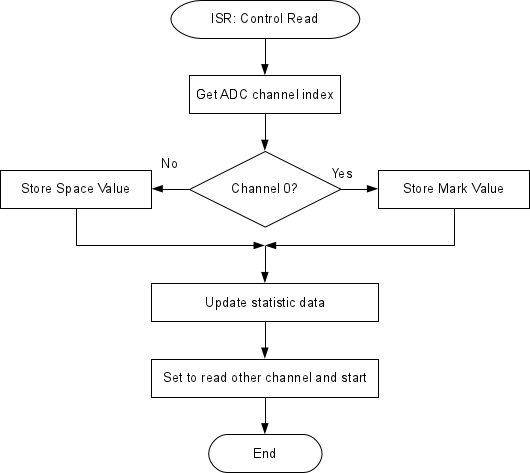
There is a latch set by a read to ADCL which is released by a read to ADCH. The Analog to Digital Converter (ADC) has more, so you need to be careful of the read order.
Now the main loop doesn't actually read the pots just uses a stored value set by the ISR, so it is fast again.
The only issue here is the ISR obviously will cause a small delay when it fires asynchronously,
but this will still be much less that waiting for a read to complete.
This appears to control the torque very well, it uses the power efficiently and uses low frequency PWM.
It still is a bit unstable at very low speeds.
The code does not vary the phase angle (fixed at 60 degrees) and still uses the 6-step algorithm inherited from the diode matrix.
The phase angle really should be set to 90 degrees which really needs the 12-step algorithm.
Some ratiometric hall effect devices have been ordered so we will test some analogue angle code as well.
ReadReceiver looks interesting as a way of using interrupts instead of loop timers.
Also to have a timer interrupt set to about half second for serial IO to receive commands and send diagnostics.
Also really could improve this with moving average algorithm for reading the pots and interrupt based sensor loop (PinChangeIntExample and Quick Reference).
And this is the CPU datasheet.
Now the interrupt system for this CPU seems straight forward the software should be converted to a fully pre-emptive model.
This way the timing is much more reliable and a user IO interface can be implemented
without needing the carefully timed co-operative model used in the PIC.
The main loop now just reads passive attributes and sends them out USB serial every second.
Possibly can receive commands in from USB serial and setting attributes.
Might be betting to start a simple diode matrix replacement again with some fresh code.
This was the revised pre-emptive diode matrix replacement:
/*
    Software replacement of the diode matrix

    Uses pin change interrupts to set the phase output.
    Should respond in a more predictable way, closer to the electrical version
*/

static const unsigned char SENSORMASK = B11111100;

// Create a sparse array populated in setup().
//  This will take more space, but will work much faster
static unsigned char PhaseMap[256];

void setup()
{
    Serial.begin (115200);
    Serial.println ("SimpleMatrix, "__DATE__" ("__TIME__")");

    // PORTB pins 5 to 0 (DIO13 - DIO08) as field control outputs.
    DDRB |= B00111111;
    // PORTD pins 7 to 2 (DIO07 - DIO02) as sensor inputs.
    DDRD &= B00000011;

    // Reset all patterns to no field output
    for (unsigned short Count = 0; Count < 256; Count++)
        PhaseMap [Count] = 0;

    //                        UUVVWW
    //         654321         -+-+-+
    PhaseMap [B01111100] = B00010010;
    PhaseMap [B10111100] = B00000110;
    PhaseMap [B11011100] = B00100100;
    PhaseMap [B11101100] = B00100001;
    PhaseMap [B11110100] = B00001001;
    PhaseMap [B11111000] = B00011000;

    //-- Sensor interrupt
    // Pin change interrupt on sensor inputs
    //  This corresponds to PCINT2_vect
    PCICR |= (1 << PCIE2);
    PCMSK2 |= SENSORMASK;

    sei();   // Enable Global Interrupts
}

// Sensors (PORTB) interrupt
//  Fires each time the sensor pattern changes
ISR (PCINT2_vect)
{
    // Simply map the field output pattern to the sensor input pattern
    PORTB = PhaseMap[PIND & SENSORMASK];
}

void loop()
{
    delay (1000); // Do nothing
}
Some quick calculations on the Field Control page show that
the software needs to be able to run the motor at about 460 field rotations per second for 100mph.
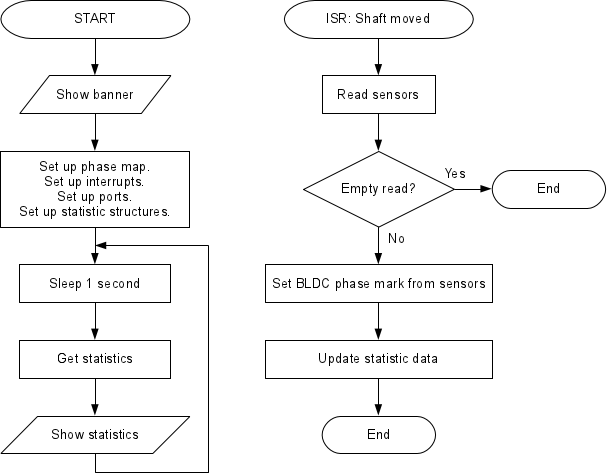
So code was added to see the rotational speed and the quality of the sensor information:
Also the ISR was adapted to ignore empty reads (when the sensors are not picking up the magnets).
460 field rotations per second is expected to be attained.
In 6 step mode this is 6 falling edges (reverse logic) so 460 x 6 = 2760 sensor interrupts per second.
So interrupts every 362.32uS with a new sensor update are expected.
In actual fact interrupts will occur twice but the rising edges will be throw away .
Since we have a serial interface which is bidirectional this allows us to talk to the controller from the PC.
This is useful to send commands to alter the state, etc:
static const unsigned short FIXEDSPACETEST = 2650;
static unsigned short SpaceTest = FIXEDSPACETEST;

static char KeyPress = '\0';    // for incoming serial data

 . . .

//  Fires each time the sensor pattern changes
ISR (PCINT2_vect)
{
 . . .
    PORTB = 0;
    ICR1 = SpaceTest;
 . . .
}

 . . .

void loop()
{
    delay (1000);

    // Check for commands
    if (Serial.available() > 0)
    {
            // read the incoming byte:
            KeyPress = (char)Serial.read();

            // say what you got:
            Serial.print ("I received: '");
            Serial.print (KeyPress);
            Serial.println ("'");

        switch (KeyPress)
        {
            case 'u':
                SpaceTest >>= 1;
                break;

            case 'd':
                SpaceTest <<= 1;
                break;

            case 's':
                PCICR &= ~(1 << PCIE2);         // stop sensor reads
                TCCR1B &= ~TIMERPRESCALEMASK;   // stop timer
                PORTB = 0;                      // shut off all outputs
                break;

            case 'r':
                PCICR |= (1 << PCIE2);          // start sensor reads

                 // Initiate movement
                if (SENSORMASK == (SensorRead = PIND & SENSORMASK))
                    SensorRead = B00010010;     // Just give it something

                PORTB = PhaseMap[SensorRead];
                break;
        }
    }
 . . .
}
This works better in a proper terminal program like gtkterm or minicom as the Arduino stuff requires you to press return to actually send.
So you can now press:
'u' to half the space time (ADCs are currently blown)
'd' to double the space time
's' to stop the motor, allowing it to run down
'r' to run the motor
There's a delay max 1 second due to the polling loop, so a serial read ISR might be better.
There is still the issue that the motor and CD etc are very light so a small kick can send it off into fast spin.
The rotary parts have a very small inertia.
Another problem is that the motor doesn't turn when the controller is powered up.
This is because the sensors don't fire interrupts until a change occurs, which doesn't happen when it is stationary.
Also we need to modify the code to allow experimentation.
This required modification of the HardwareSerial Arduino module to comment out the USART_RX_vect section (in a local copy).
Hence Serial. is renamed to COM.
Now the feasibility studies are done, the goal of the synchronous torque controller can be pursued.
So the stepper code has been improved with a pre-emptive stepper algorithm.
This means we can include other pre-emptive code or drop this algorithm into the other code easily.
The motor control works fine at low speeds when using an external supply control (like a variable voltage switch mode PSU),
but when using the synchronous torque algorithm to start and at low RPMs the behaviour is chaotic.
So the solution may be to include a low frequency PWM algorithm (say 50Hz) to control the power delivered during the synchronous "mark".
This way the high power "kicks" the motor gets at low speeds are controlled by reducing the power of the pulses.
It would work, but it is moving away from the pure synchronous torque strategy which is key to reducing loss in the controller.
What needs to be achieved is the control of the motor should not be based on the sensors but an internal model of the rotation using the sensors to adjust the model.
This is sort of what the dq0 (clarke and park) model is doing, but dq0 requires ratiometric sensors, ADCs and complex maths algorithms, all of which cause delays in the processing.
The synchronous torque model is very fast partly because it uses digital sense information which requires no conversion.
This means the mechanics are a bit more complicated and the electronics also takes a hit too,
but the extra time and cost of this is offset by needing a faster CPU and ADCs to handle the analogue signals and authoring and debugging complex code.
There's also the issue of noise which means the ratiometric hall sensors cost quite alot more than digital ones and there is a compromise in accuracy.
All this is moving away from the strategy of using the simplest system as faster CPU, more complex code,
high speed ADCs and high accuracy ratiometric sensors are all effectively part of a hack to work around new problems introduced by going down this route.
This brings new problems which end up being a compromise, when a simple, accurate, well tested solution is already available.
The need for PWM proportional control will help in starting the motor from stationary and means the full power of the battery
will not be fed into the motor inductors to get the motor (and the car) moving, which was an issue.
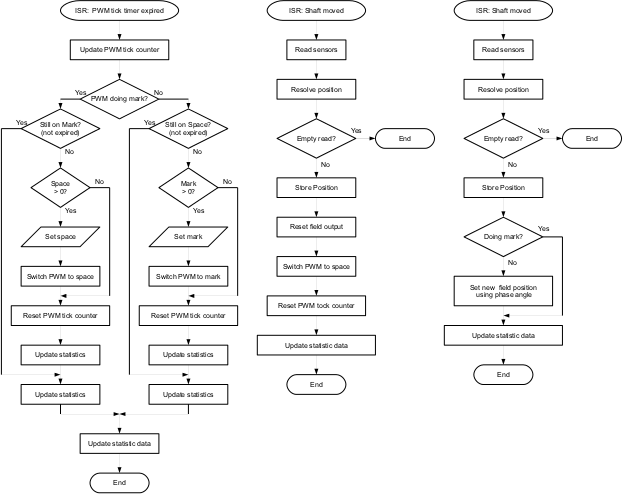
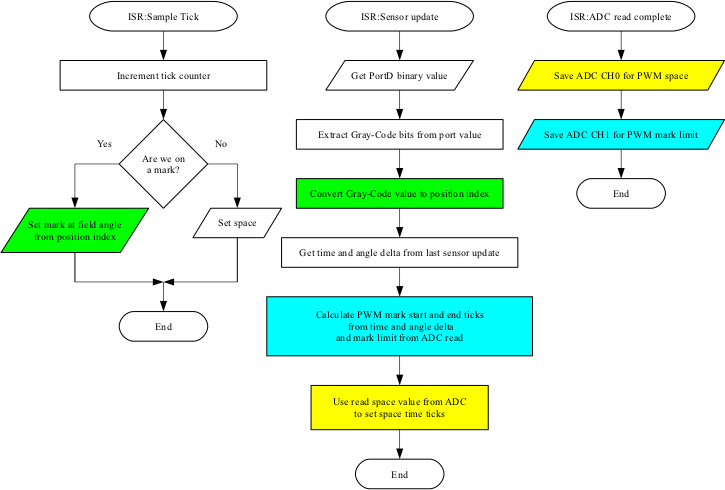
This is where we have a PWM tick timer which is running at 50kHz (period 20uS).
The PWM is timed by counting the number of 20uS ticks for each state (mark and space).
The sensor algorithm resets the state to space when the shaft moves to the next position.
This works better as there is no setting up and resetting of timer interrupts, which causes instability.
Also this means we can have a zero mark or space without confusing the CPU with a zero time interrupt.
Finally it means we can easily meter the amount of time the controller actually spends in a PWM state.
Here we have the core algorithms with the new sampled PWM algorithms:
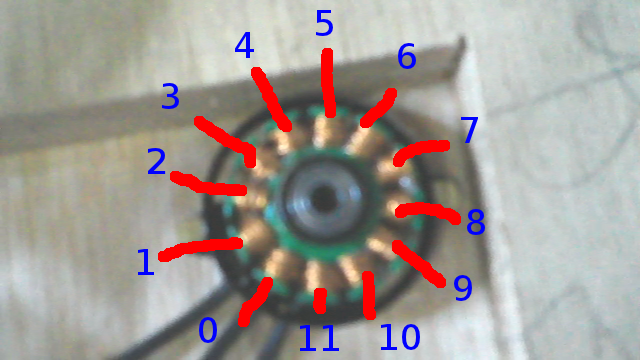
From this and other animations on this page the connectivity was worked out.
Also the fact that this is a DELTA motor, not a WYE as was expected.
        + + +                    11
       UUVVWW     01 23 45 67 89 01
       - - -     V  W  U  V  W  U  V
STEP1  010010     Ns    Ns    sN
STEP2  000110     Ns    sN    sN
STEP3  100100     Ns    sN    Ns
STEP4  100001     sN    sN    Ns
STEP5  001001     sN    Ns    Ns
STEP6  011000     sN    Ns    sN
                     Ns    sN    sN
                     Ns    sN    Ns
                     sN    sN    Ns
                     sN    Ns    Ns
                     sN    Ns    sN
                     Ns    Ns    sN
Class-D 3-Phase Controller Design
Having just read up about Class-D audio amplifiers, it appears there is the opportunity to simplify the design.
This is a radical deviation in the design philosophy and requires modification of all parts of the controller.
The Class-D amplifier is a H-bridge, or 2 x 180 degrees phases output.
This will be modified to a 3 x 120 degrees phases.
In the software, this means using a 3-output algorithm to drive to either rail instead of 6-output which control the rail switching independently.
There is a way to have Space Vector Modulation without the heavy maths using a software flywheel model.
This involves having an open loop SVM with sensor updates for the amplitude.
The open loop model rotates the stator field vector and thus the AC phase without sensor input.
The sensors interrupt and provide the position information as above.
The difference between the open loop model and the real position is calculated and this is used to adjust the scalar amplitude of the vector.
This scalar amplitude can be negative as the torque angle is 90 degrees, so less than 90 is positive and greater is negative.
This is better than DQ0 (clarke and park) since it does not rely on sensors to provide the vector.
The motor can continue to rotate even if there are no sensors.
Also there is an inherent delay in the calculation of DQ0 so there is an inaccuracy in that.
This is normally adjusted by calculating with a phase advance, but this is really just a guess as there is no way to predict the load.
Software flywheel model also can detect if there is a problem which DQ0 does not do naturally.
If the motor suddenly appears to do something impossible or dangerous (like suddenly reverse)
the comparison with the internal model will show this has happened and the controller can do something about it.
Arduino Timers and PWM
Arduino PWMs are run from the timers so they are independent of software.
There are 3 timers each operate 2 PWM outputs giving 6 PWM outputs.
All 3 timers have different ways of configuring, but the common mode is 8-bit and they share a set of prescaler divisors.
The trick is to set up the PWMs in the same mode and with the same prescaler,
then reset all the timers and you will have all PWMs operating the same (including being in phase).
The ATmega328 CPU is an 8-bit integer CPU, so for the fastest performance the algorithms need to use this.
The value 252 has common integer factors of both 3 (phases) and 4 (quadrants)
If the amplitude is -127 to +127 for full scale and the angles are calculated as 252 being a full turn this will work.
In pre-calculating a SINE table (which means fast trigonometry) only the first quadrant is needed.
all other quadrants can be calculated from this as with normal SINE,
however the values for a quarter/half/three-quarters/full turn are actually on quadrant boundaries.
This means to pre-calculate the first quadrant, values for 0 AND a quarter turn need to be included.
252 is a full turn, 252 / 4 = 63 so this means we need 64 values to include both the first (0) and last (63) values.
The SINE table above is calculated for the first quadrant, but we need to calculate 0 to 63 inclusive (63 = exactly a quarter turn, so a quadrant boundary). AllQuadrantAmplitude then will work correctly and produce accurate SINE values.
Also the angles for phase V and W need to be in the range 0 <= A < 252, which means in AngleToAmplitudes we need to allow for results which would be >252.
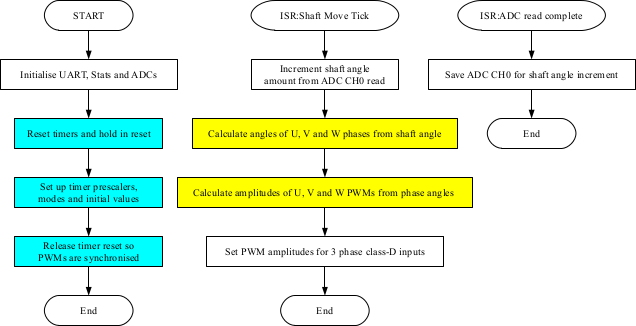
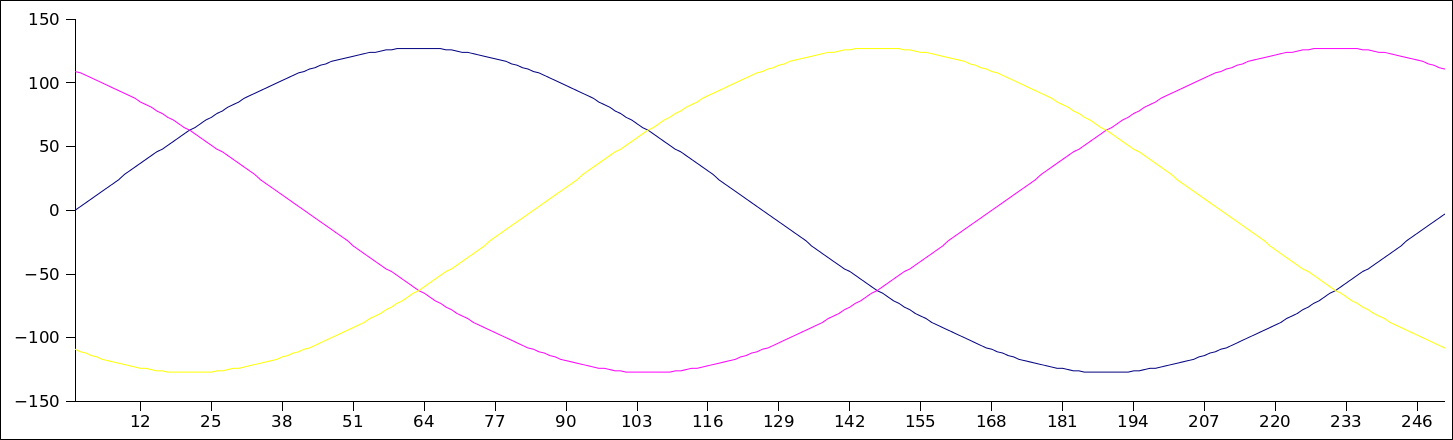
The waveforms for all 3-phases were output from the software to check the calculations:
Instruction Cycles

MUL         2 (unsigned)
MULS        2 (signed)
MULSU       2 (signed with unsigned)

LSL         1
LSR         1
The number of cycles is for the full fetch-execute, but these are piplines, so multiplications are fast and so are bitshifts!
In order to do the "input * factor" bit we need a 16-bit answer to this might be a 16-bit operation.
According to all the documentation this is 6 times an 8-bit multiply so:
 6 * 62.5nS = 375nS for the multiply
 8 * 62.5nS = 500nS for the shifts
14 * 62.5nS = 875uS total
Maybe needs a bit more research, but this is a better solution than using tables.
There is an offset due to integerisation so the standard maths rounding needs to be applied:
output = integer (input + 0.5)
0.5 is a floating point so this is done by bitshifting again:
(((UAmplitude * PWMAmplitude) >> 6) + 1) >> 1
Adding 1 before the last shift is the same as adding 0.5 to the result.
Also the scaling is actually 0 < factor < 127 -not 128
The PWM scales down gradually from the full scale by up to 1 count at 127 (max)
This is an average of 0.5, so adding 0.5 to the scale factor cures this:
This costs 2 more clocks for the add and extra shift.
 6 * 62.5nS = 375nS for the multiply
 8 * 62.5nS = 500nS for the shifts
 3 * 62.5nS = 125nS for the extra adds and shift
17 * 62.5nS = 1062.5nS ~ 1uS total
Double this to account approximately for the phase amplitude calculations
and we are around 2uS for the whole thing.
at 6,500 rpm so 6500 * 4poles / 60seconds = 433.33 field rotations/second.
That's 0.002307692 secs or 2.3mS per rotation.
For at least a 6 step BLDC this means 2.3mS / 6 = 385uS at most for processing so that's no problem.
Each of the 252 steps of the full turn would take 0.000009158 secs or 9.158uS.
We need to calculate 3 phases so 2uS * 3 = 6uS.
This is safely less than the 9.158uS required to maintain maximum resolution at full speed.
A test of the real speed is required now.
Testing
A rather rough time testing of the update loop shows the calculations are a bit optimistic:
The original calculated 6uS was for the AC synthesis calculations only.
There is other code involved in the ShaftMove loop which accounts for the other 5.6uS.
This was expected.
So as you can see we are looking at 11.6uS update speeds which equates to 5,135 RPM.
This is to maintain full accuracy of the 3-phase AC waveform.
For our 6,500 RPM giving 100 MPH, 5,135 RPM equates to 79 MPH.
1.29 angle ticks is 0.51% of a full field turn.
Or there are 195 updates per field turn.
On our Prius motor with 4:1 field to shaft this is 781 updates per rev (at full speed of 6,500 RPM)
So while it's not a perfect 3-phase AC waveform at full speed, it's certainly good enough.
Limitation of PWM in AC synthesis
Since we are using PWM and not an actual analogue output for AC synthesis this causes issues of it's own.
The target PWM frequency is around 15kHz (we are actually testing at 32kHz) which is ~60uS period.
This means we can update the amplitude in 11.6uS but the PWM period is 60uS.
If the field rotation update period is 60uS we would have 252 * 60 = 15120 ~ 15mS rotation period.
1 / 0.01512 = 66.133 rotations/sec
...this is field rotations so 66 / 4 = 16.5 shaft rotations/sec.
16.5 * 60 = 990, so about 1,000 rpm.
If the designed speed is 100mph for 6,500rpm this means the vehicle will be going at 15 mph.
So to maintain precise AC synthesis the vehicle is limited to around 15mph,
which is much less than the limit due to update speed shown from testing above.
60uS / 2300uS (2.3mS per rotation) = 0.0261 rotations per PWM tick.
This means in the time it takes for a PWM output to go high then low the field has rotated over 9 degrees.
Or, put another way, this is 1/0.0261 = 38.3 PWM updates per rotation.
At these speeds the AC synthesis waveform would be inaccurate which leads to inefficiencies.
Compare that with Synchronous Torque where there is 1 update per sensor pass so:
6 sensors x 4 field rotations = 24 updates per rotation (and this is a fixed amount at all speeds).
The difference with Synchronous Torque is the updates are carefully timed to provide the most efficient torque pulse.
Whereas, with AC synthesis the updates are random in relation to the field.
The trade off between AC synthesis accuracy and PWM frequency would be true for all controllers, not just this one.
Higher frequencies would allow more accurate AC synthesis but at the cost of loss in the IGBTs.
Combined Hybrid Controller
I'm sure there are some clever phase compensating SVM algorithms for high speed AC synthesis,
but our controller cuts to the chase by using the benefits of both AC synthesis and BLDC.
This would be the first controller of it's kind to do this.
BLDC is efficient at high shaft speed, but can be unstable at very low speed
due to the extremely short pulses needed to maintain momentum.
AC synthesis is smooth at low speed, but is less efficient at high speed due to inaccuracies in the waveform.
The aim is to use AC synthesis at low shaft speeds which gives us smooth control of the motor right down to stationary,
then at higher shaft speeds switch to BLDC to give us reliable pulsing up to the full speed of the motor.
SVM for AC synthesis would be done using the software flywheel and the BLDC would be the synchronous torque algorithm.
Obviously this means the transition between AC synthesis and BLDC would need to be carefully done.
The outputs are switched between PWM mode and direct output, and the field vector and amplitude would need to be smoothly maintained
The benefits over just AC synthesis would be more efficiency and higher power at higher shaft speeds.
Also this means the IGBTs would not need to deal with high frequencies at high power
so cheaper components can be used.
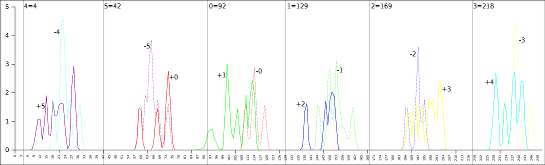
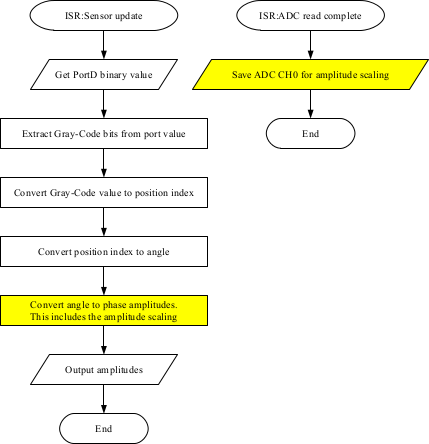
And this is added to the code, so now a closed loop algorithm is functional:
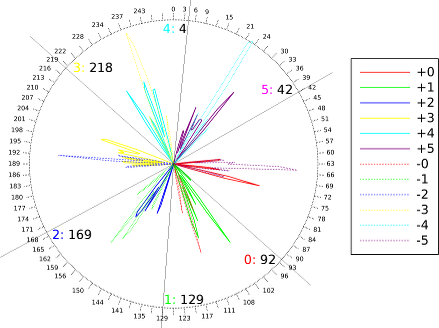
static unsigned char SensorAngle[] =
{
    92, 129, 169, 218, 4, 42
};

// Sensors (PORTD) interrupt
//  Fires each time the bit pattern changes
ISR (PCINT2_vect)
{
    PortRead = ~((PIND & 0b00011100) >> 2) & 0b111;

    SensorIndex = GreyCodeIndex[PortRead];

    signed short FieldAngle = SensorAngle[SensorIndex];

    if (Direction > 0)
    {
        FieldAngle += FIELDANGLE;

        if (FieldAngle > MAXANGLE)
            FieldAngle -= MAXANGLE;
    }
    else
    {
        FieldAngle -= FIELDANGLE;

        if (FieldAngle < 0)
            FieldAngle += MAXANGLE;
    }

    unsigned char i8FieldAngle = FieldAngle;

    UpdateField (i8FieldAngle);

    sei();
 . . .
}
Software Flywheel Algorithm
The sensor input only part of the story really.
In order to have AC synthesis the zones between the sensor inputs are required.
This is where the "flywheel" comes in.
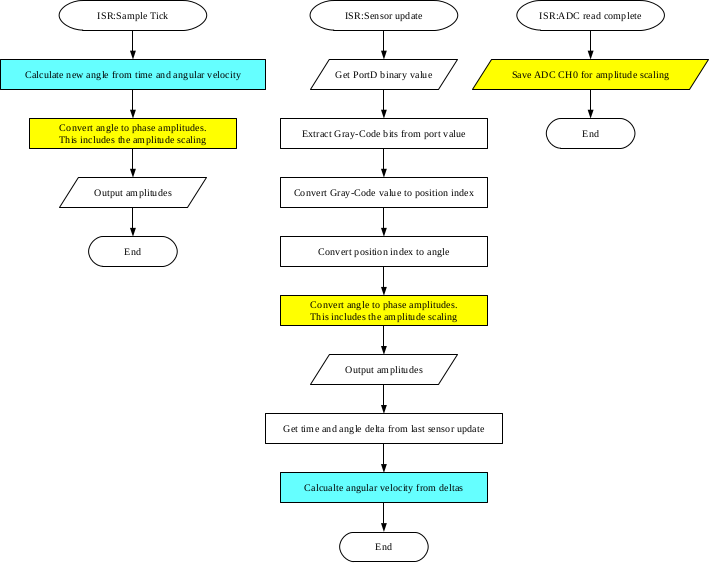
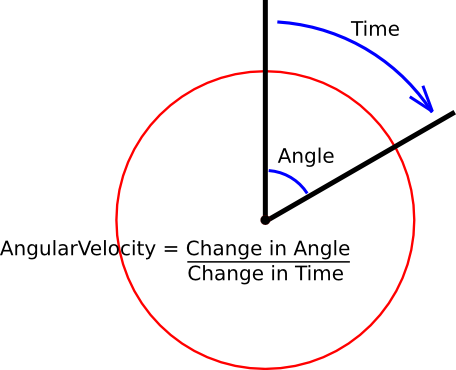
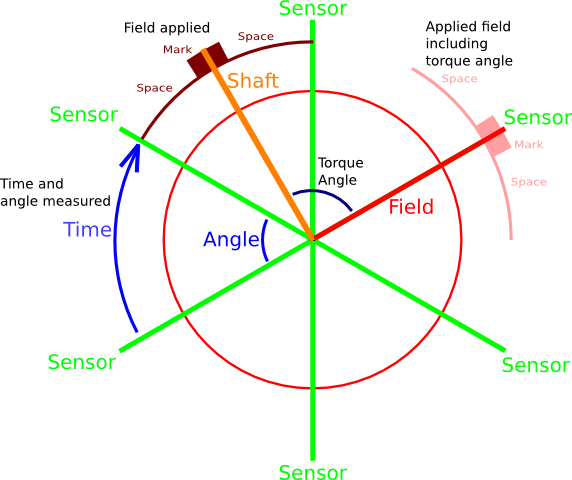
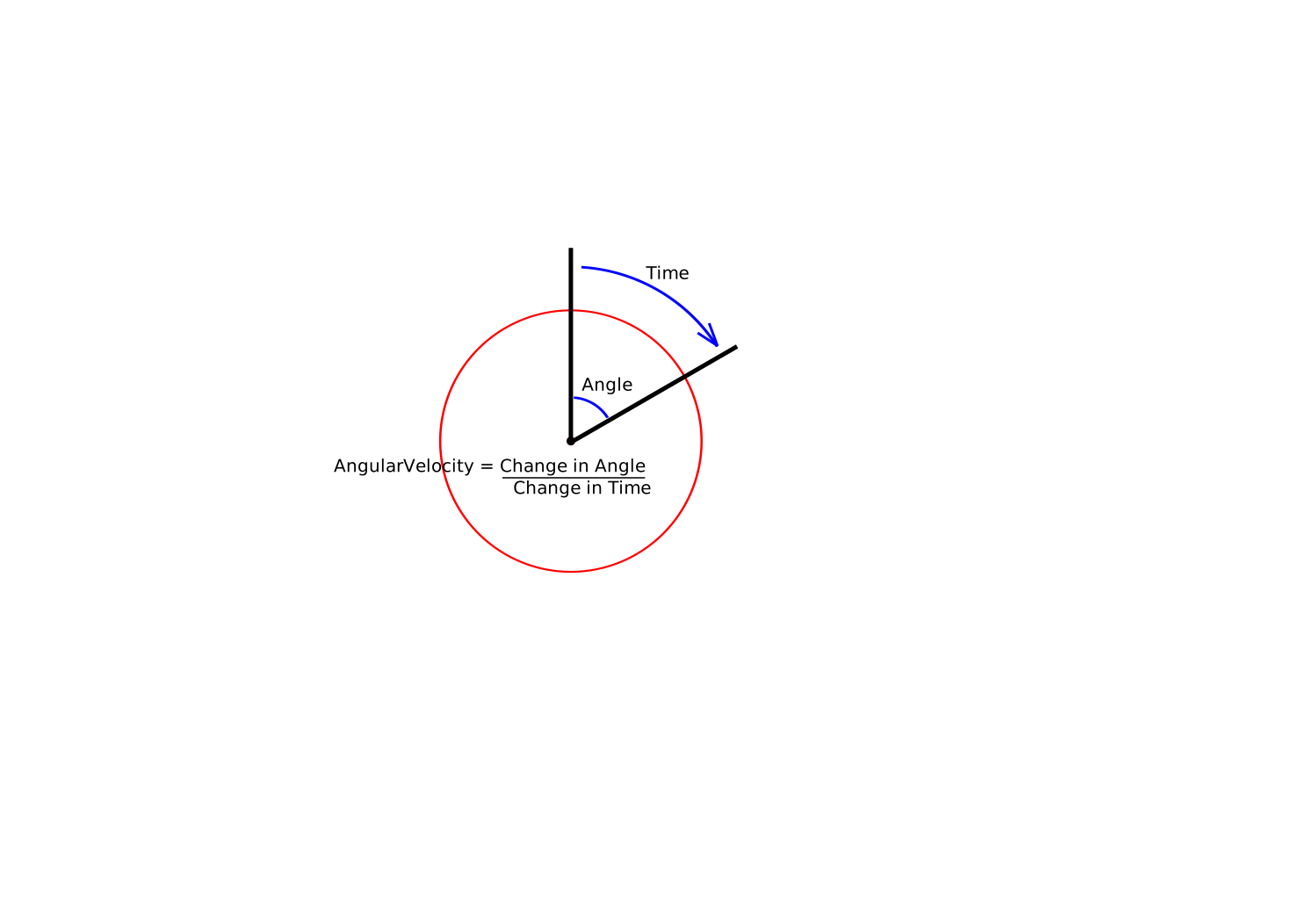
The angular velocity is calculated on a sensor update.
This is used to calculate angle updates based on time only without sensor input.
An unrefined test is added to assess the feasibility of the method.
This slow as it uses floating point variables and division, both of which are time intensive.
To test the actual sensor field update was removed so the motor relies entirely on the time based updates.
The motor performed reasonably well at low speeds, but high speeds are just not working.
This is due to the inefficient algorithm.
None the less, the method works.
Next step is to redo the angular velocity algorthms with integer methods and no division.
This is going to require a bit of lateral thinking.
Floating point arithmetic without floating point
...and division without dividing
In a word: fractions.
Floating point is a way of representing real, non-integer numbers.
Also it's a way of representing very large or very small numbers.
But there is another way and that is to use fractions.
The numerator and denominator are, of course, integers.
So we can represent a real non-integer number using two integers.
We can also have very small numbers where the denominator is large and the numerator is small.
Now, we are trying to represent a fractional increment of an angle (angular velocity)
so we can increment the field angle between sensor updates from a timer.
We have the fraction from AngleDelta/TimeDelta but this would result in a jump of a whole sensor, in theory, which is pointless.
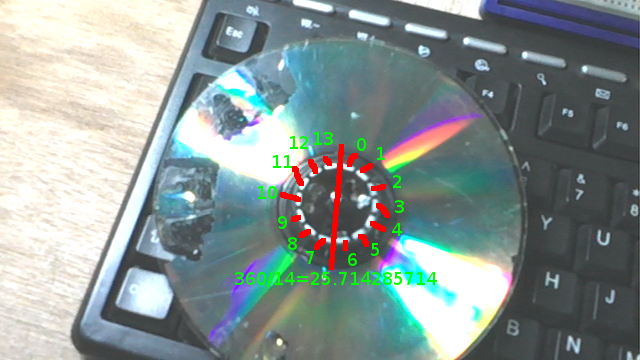
One sensor read is 1/6 of a turn which is 42 angle ticks,
so we "cancel" the fraction down by 32 using a math-rounding bitshift (in green above) which gives us close to 1 angle tick.
This was tested and works.
It produced relative stable rotation down to 60 RPM, and even as low as 25 RPM.
This is shaft rotations, so this is 2.167 field revs/second or 0.34 seconds/field rotation.
At these speeds, bearing in mind this is just a CD with small magnets so the torque would be very small.
Just the magnetic attraction when passing a sensor is enough to stop it.
In other words, slow enough for the momentum of the wheel to not be enough to carry it to the next sensor update.
So the software flywheel did carry the field to the next sensor smoothly.
Since a working AC synthesis controller using the software flywheel is now developed, a hybrid AC synthesis/BLDC controller is the next step
This is a case of switching the PWM outputs to digital pin outputs, disabling the SVM algorithms and enabling the synchronous torque BLDC algorithms.
The design is to do this around 500 RPM but it may be more efficient at high power to do this a lower RPM.
First step is to integrate the BLDC code so it can be switched by key press.
Which is now done.
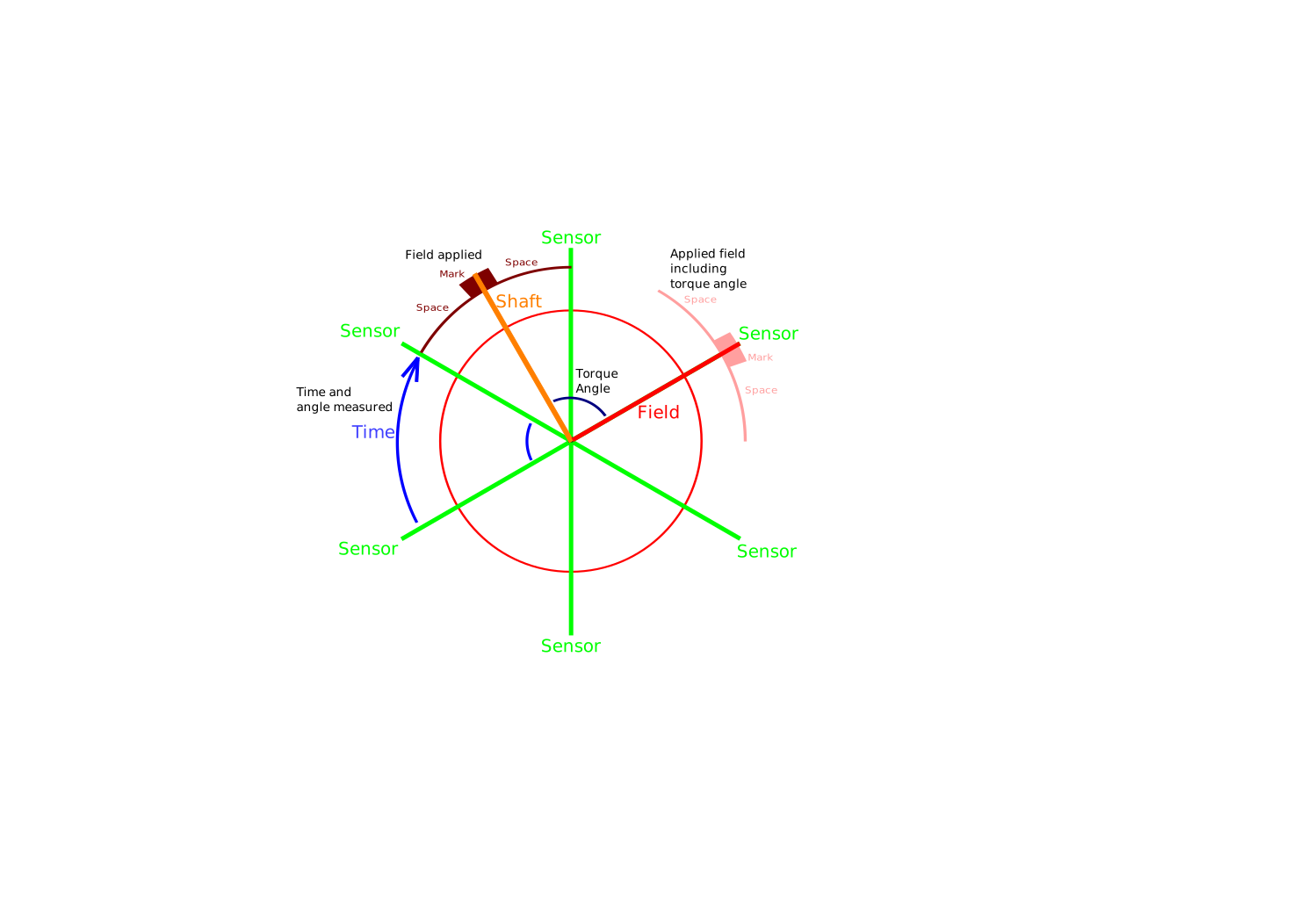
So we can use the software flywheel to improve the performance of the Synchronous Torque algorithm.
Same as before the previous sensor updates will be used to assess the angular velocity and this will be use to calculate the mark position and width.
The algorithm will be much simpler as this does not have to calculate an angle fraction, just the time for the full step.
The communication between the controllers and the display in the car are going to be using good old ethernet.
It's much faster than CAN bus and it means a person can diagnose the problems on a PC without any special hardware, like ODB-II units.
And the USB-serial communication is quite simple and very useful, but it just doesn't cut it when you need high speeds for real time displays.
LIN: 19.2kbps.
USB serial: 112kbps (up to ~1Mbps if you use a special serial module).
USB 2.0: 480Mbps.
CAN: up to 8Mbps, but that's stretching the limit. Most chips operate at 10-100kbps.
SPI: as a defacto standard effectively unlimited. Chipset with 100Mbps are not uncommon.
Ethernet: 10Gbps is currently used for server interconnects (although the W5100 chip is only capable of 25Mbps).
So as you can see, for raw transfer speed ethernet really is the daddy.
As ever this means we need to author some simple core code which will do what we need without the Arduino libraries.
The libraries are good, for what they are, but when I'm packing in all the controller functionality
and ensuring it runs smoothly without lockups this needs quite a bit of refining.
Including dealing with SPI and the SPI protocol and using external interrupts on the Arduino
PIC software created in Piklab,
Arduino software created in the Arduino IDE,
animations created in qcad/librecad,
plots and graphs GNumeric,
images edited in gimp,
flowcharts created in LibreOffice Draw.